Browser Fingerprinting and Online Tracking
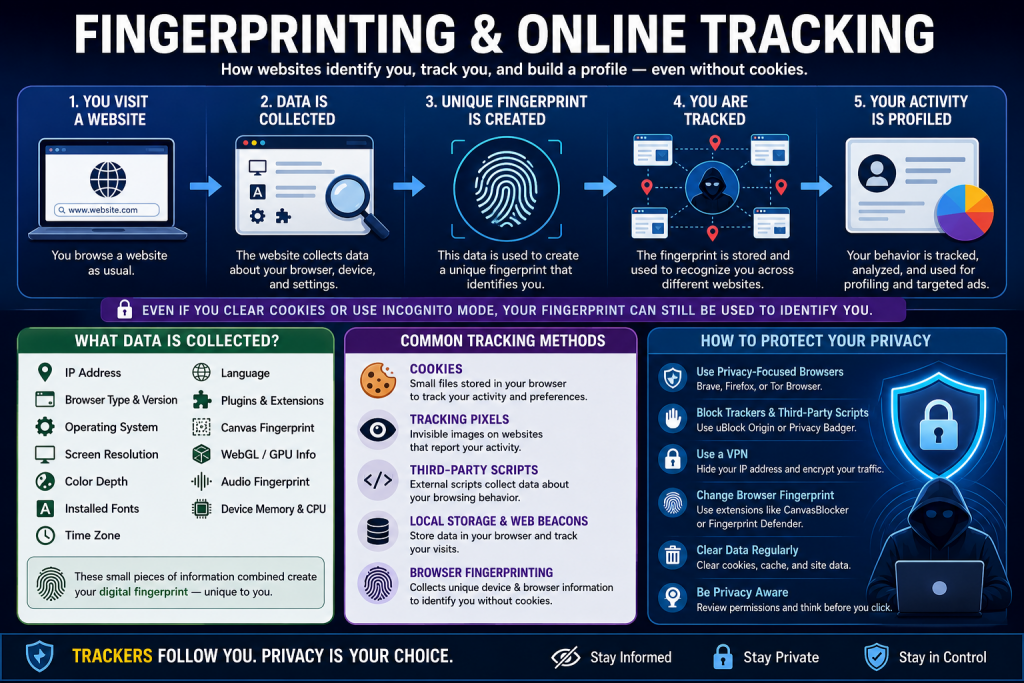
You might think browsing in “incognito mode” or clearing your cookies makes you anonymous online. Unfortunately, it’s not that simple. Browser fingerprinting is a sophisticated tracking technique that can identify you without cookies, even across different browsing sessions. Let’s understand how it works and what you can do about it.
What Is Browser Fingerprinting?
Every time you visit a website, your browser shares information about itself: what type of browser you’re using, your screen resolution, installed fonts, plugins, timezone, language preferences, and much more. Individually, these details seem innocuous. But combined, they create a unique “fingerprint” that can identify your specific browser with surprising accuracy.
Research from the Electronic Frontier Foundation found that 83.6% of browsers have unique fingerprints. Even among users with common configurations, the combination of attributes often creates identifiable patterns.
How Fingerprinting Works
When you visit a website, it can query your browser for various attributes:
Basic Information: User agent string (browser type and version), operating system, screen resolution, color depth, timezone.
Installed Plugins and Fonts: What plugins like Flash or Java you have, and what fonts are installed on your system. The specific combination is often unique.
Canvas Fingerprinting: Websites can render text or graphics using HTML5 Canvas and measure tiny differences in how your specific combination of hardware and software renders them. These differences create unique identifiers.
WebGL Fingerprinting: Similar to canvas but using 3D graphics capabilities. Different graphics cards and drivers render WebGL content slightly differently.
Audio Fingerprinting: Measuring how your system processes audio signals, which varies based on hardware and software configurations.
Why Fingerprinting Is Powerful
Unlike cookies, fingerprints don’t require storing anything on your computer. You can’t delete them like you delete cookies. They work across different browsers on the same computer. And they persist even when you use “private” or “incognito” mode.
This makes fingerprinting particularly attractive to trackers. Even users who actively manage their privacy by blocking cookies and using privacy tools can potentially be tracked through fingerprinting.
Who Uses Browser Fingerprinting?
Advertising networks use it to track users across websites for behavioral advertising. Analytics companies use it to identify unique visitors. Some websites use it for fraud detection, identifying suspicious patterns of behavior. Banks and e-commerce sites sometimes use it as part of security measures.
The technique isn’t inherently evil – like most technology, it can serve legitimate or problematic purposes depending on how it’s used. The concern is that it happens invisibly, without user consent or control.
The Privacy Implications
Fingerprinting undermines user control over tracking. When you clear cookies or use privacy settings, you’re expressing a preference not to be tracked. Fingerprinting ignores these preferences, tracking you anyway.
It also makes it difficult to separate your identities. Maybe you want to keep your work browsing separate from personal browsing, or use different personas for different online communities. Fingerprinting can link these activities if they come from the same browser on the same computer.
How Privacy Tools Fight Back
Tor Browser: Designed specifically to resist fingerprinting. It standardizes many attributes so all Tor Browser users look similar. Window sizes are standardized, fonts are limited, and many fingerprinting techniques are blocked or spoofed.
Brave Browser: Implements fingerprinting protection by randomizing certain values and blocking fingerprinting scripts. Each session gets slightly different values, preventing consistent tracking.
Firefox Privacy Features: Firefox has added various anti-fingerprinting measures, including blocking third-party tracking cookies by default and implementing protections against canvas fingerprinting.
Browser Extensions: Privacy-focused extensions like uBlock Origin, Privacy Badger, and NoScript can block fingerprinting scripts, though this can sometimes break website functionality.
The Arms Race
Fingerprinting vs. privacy protection is an ongoing arms race. As browsers implement protections, trackers develop new techniques. As those techniques become known, privacy tools develop countermeasures. This cycle continues indefinitely.
Recent examples include battery status API fingerprinting (now restricted), accelerometer fingerprinting on mobile devices, and increasingly sophisticated combinations of data points to create unique identifiers.
The Paradox of Uniqueness
Here’s an interesting problem: if you use too many privacy protections, you might make yourself more unique and thus more easily fingerprintable. This is called the “paradox of privacy tools.” The solution is for privacy tools to make many users look the same, rather than making individuals invisible.
This is why Tor Browser doesn’t let you install additional extensions or change settings that would make your configuration unique. The goal is anonymity through similarity, not uniqueness.
Testing Your Browser Fingerprint
Several websites let you test how unique your browser fingerprint is. The Electronic Frontier Foundation’s “Cover Your Tracks” (formerly Panopticlick) and AmIUnique are popular testing tools. They show what information your browser reveals and how unique you are.
Try testing different browsers and privacy settings to see how they affect your fingerprint. This hands-on experimentation helps you understand what makes browsers identifiable.
Practical Steps for Reducing Fingerprinting
Use privacy-focused browsers: Tor Browser for maximum protection, or Firefox with enhanced privacy settings for daily use.
Limit extensions and customizations: Each additional element makes you more unique. Stick with standard configurations when possible.
Enable privacy features: Turn on tracking protection, disable third-party cookies, and use built-in anti-fingerprinting features.
Consider multiple browsers: Use different browsers for different activities to compartmentalize your digital identities.
Stay updated: Browser updates often include new privacy protections. Keep your software current.
The Future of Fingerprinting
As browsers implement stronger privacy protections and restrict APIs that enable fingerprinting, trackers develop new techniques. Machine learning might identify users through behavioral patterns like typing speed, mouse movements, and scrolling behavior.
This suggests fingerprinting will remain a challenge. The solution likely involves both technical protections and regulatory approaches requiring user consent and transparency in tracking practices.
What Students Should Take Away
Browser fingerprinting demonstrates that privacy isn’t simple. It’s not enough to just block cookies or use incognito mode. Real privacy requires understanding the full scope of tracking techniques and using tools specifically designed to counter them.
For students studying privacy, security, or web development, fingerprinting shows why privacy must be designed into systems from the start. Retrofitting privacy protections onto systems designed for tracking is an uphill battle.
Understanding fingerprinting also illustrates the tension between website functionality and user privacy. Many web features that enable rich experiences also enable tracking. Finding the right balance is an ongoing challenge for browser developers, websites, and users.